Settings
Settings added or changed by this fork. For everything else in Settings, including the Plex connection, Radarr and Sonarr servers, Trakt, and other sources, see the upstream docs.
The Settings screen has seven tabs: General, Plex, Sources, Downloads, Logs, Jobs and About.
Container environment variables
Set these in the Docker Compose environment: list. Agregarr reads them when the container starts.
| Variable | Default | What it does |
|---|---|---|
PUID |
99 once either PUID or PGID is set |
The user ID Agregarr runs as. Use the ID of the user who owns your media folders (id -u). |
PGID |
100 once either is set |
The group ID Agregarr runs as (id -g). |
UMASK |
022 |
The permission mask for files and folders Agregarr creates. Only applied when PUID or PGID is set. |
TZ |
unset (UTC) | Your timezone, e.g. Australia/Sydney. Agregarr uses it to work out calendar days for air dates. See the timezone check. |
LOG_LEVEL |
info |
The starting log level. See Log Level. |
Without PUID or PGID, Agregarr runs as the container's default user and ignores UMASK. Set either one and the container creates the user and group if needed, takes ownership of the config folder (/app/config), then runs as that user.
Use the PUID and PGID of the user that owns your media directories. On Unraid, use PUID=99 and PGID=100. Agregarr only changes ownership of the config folder. It doesn't touch your placeholder folders, so the same user needs write access to those too. The Data Directory health check reports when Agregarr can't write to the config folder. See Health Checks.
General
Settings > General.
Log Level
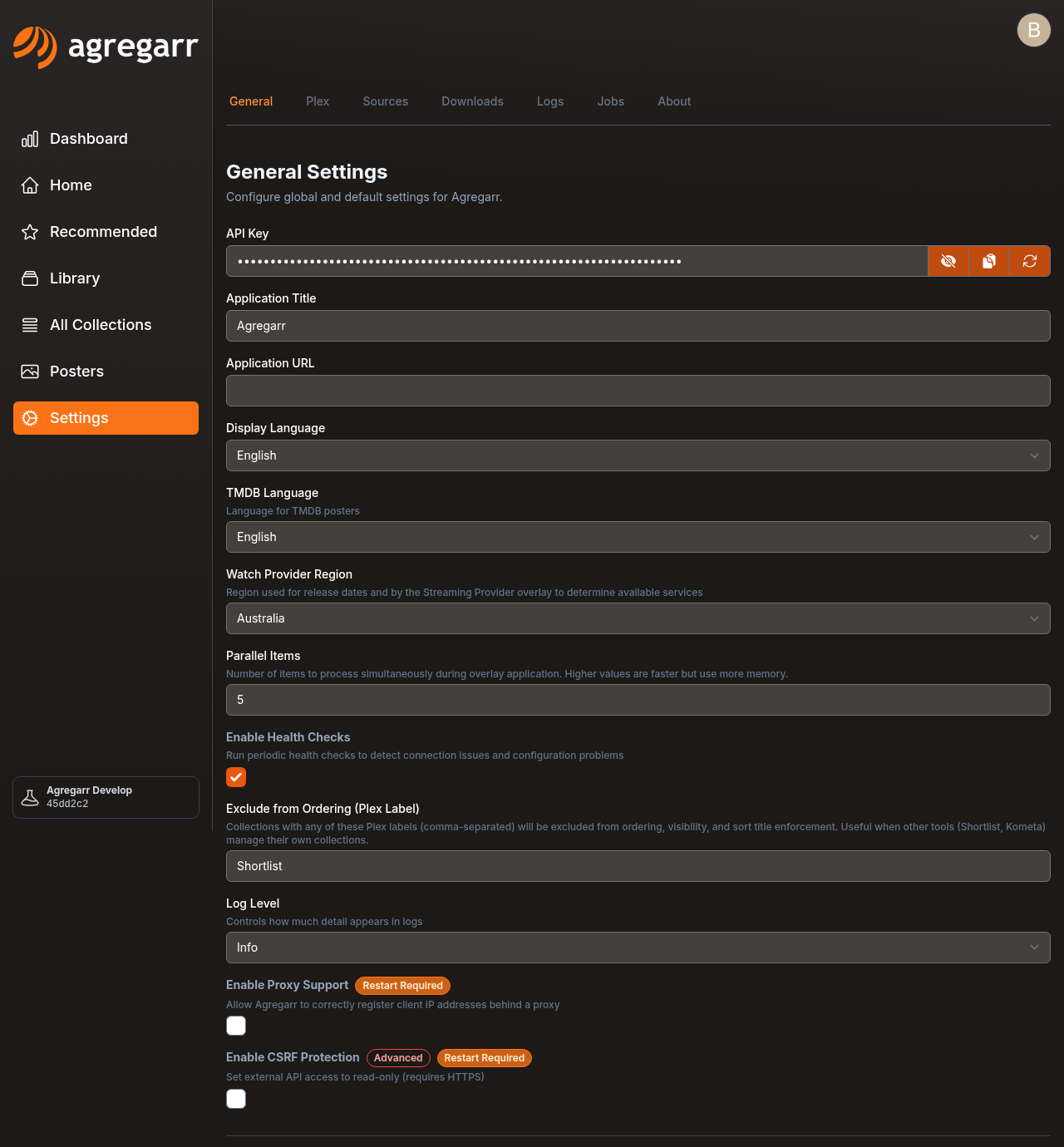
Log Level controls how much detail Agregarr writes to the logs. The options are Error, Warning, Info and Debug. The default is Info. Save the setting and it changes straight away, with no restart needed.
Debug writes the lot, including one line per item for things like overlay change checks. Use it while chasing a problem, then turn it back down. Error shows only errors, Warning adds warnings, Info adds routine progress, and Debug adds everything.
The LOG_LEVEL environment variable only sets the initial value. Once Agregarr has saved its settings, it uses the saved Log Level at startup instead. Change it here rather than in the environment.
Logs go into the logs folder inside your config folder. They rotate daily or when they reach 20 MB, get compressed after rotation, and stay around for 7 days. Settings > Logs shows them with a severity filter.
Watch Provider Region
Watch Provider Region is a country list. The default is United States (US). Its tip reads: "Region used for release dates and by the Streaming Provider overlay to determine available services".
Changing it affects:
- Streaming provider: the provider shown for a title comes from that country's list. This applies to the Streaming Provider overlay and the streaming provider variables.
- Movie release dates: for each type (cinema, digital, physical), Agregarr uses the earliest date in that country. If the country has no date of that type, it falls back to the earliest date from any country. These dates feed the overlay variables and the release date used for Coming Soon placeholders.
Release dates are cached separately by region, so changing the setting doesn't need a cache clear. Overlays use the new region the next time they run.
Parallel Items
Parallel Items sets how many items Agregarr processes at once while applying overlays. It accepts a number from 1 to 10. The default is 1. Higher values run faster but use more memory. See Performance.
Exclude from Ordering (Plex Label)
Exclude from Ordering (Plex Label) takes a comma-separated list of Plex labels. It's empty by default.
Agregarr leaves matching collections alone if it didn't create them. It won't reorder them, enforce their visibility, or manage their sort title. This is useful for collections managed by another tool, such as Shortlist or Kometa.
Labels match exactly or as a prefix followed by an underscore, and case doesn't matter. Shortlist matches Shortlist and Shortlist_alex. Agregarr refreshes the flag whenever it discovers collections, so adding or removing a label takes effect on the next sync.
Enable Health Checks
Enable Health Checks is on by default. Clear it to stop the checks and hide the Health Checks section on the About tab. See Health Checks.
Plex
Settings > Plex.
Collection Sort Format
Collection Sort Format controls how Plex treats a leading "The", "A" or "An" when sorting collections. The default is Off (sort exactly as typed).
- Strip (e.g. "The Accountant" → "Accountant"): sorts as "Accountant".
- Move to End (e.g. "The Accountant" → "Accountant, The"): sorts as "Accountant, The".
This only changes the sort title, never the collection name. Move to End groups titles by article, but it can split up a series: "Matrix Reloaded, The" sorts before "Matrix, The". If another tool such as Kometa also sets sort titles, use the same scheme in both tools or turn one off.
Auto Empty Trash
Auto Empty Trash is on by default and marked as an advanced setting. After cleaning up placeholders, Agregarr may empty the library's Plex trash to remove ghost entries. This also removes unrelated items already sitting in the trash. Turn it off if you don't want that. See Placeholders.
Downloads
Settings > Downloads contains the placeholder folder and trailer settings. The relevant pages cover them in more detail:
- Placeholder Root Folders and the folder naming options: Placeholders.
- Trailer sources, word lists and YouTube Cookie Configuration: Integrations.
- Seerr Settings: Integrations.
- Plex Webhook: Placeholders.
Sources
Settings > Sources contains the Cloudflare solver list, the Letterboxd option, Tracearr and Maintainerr. See Integrations.
Jobs
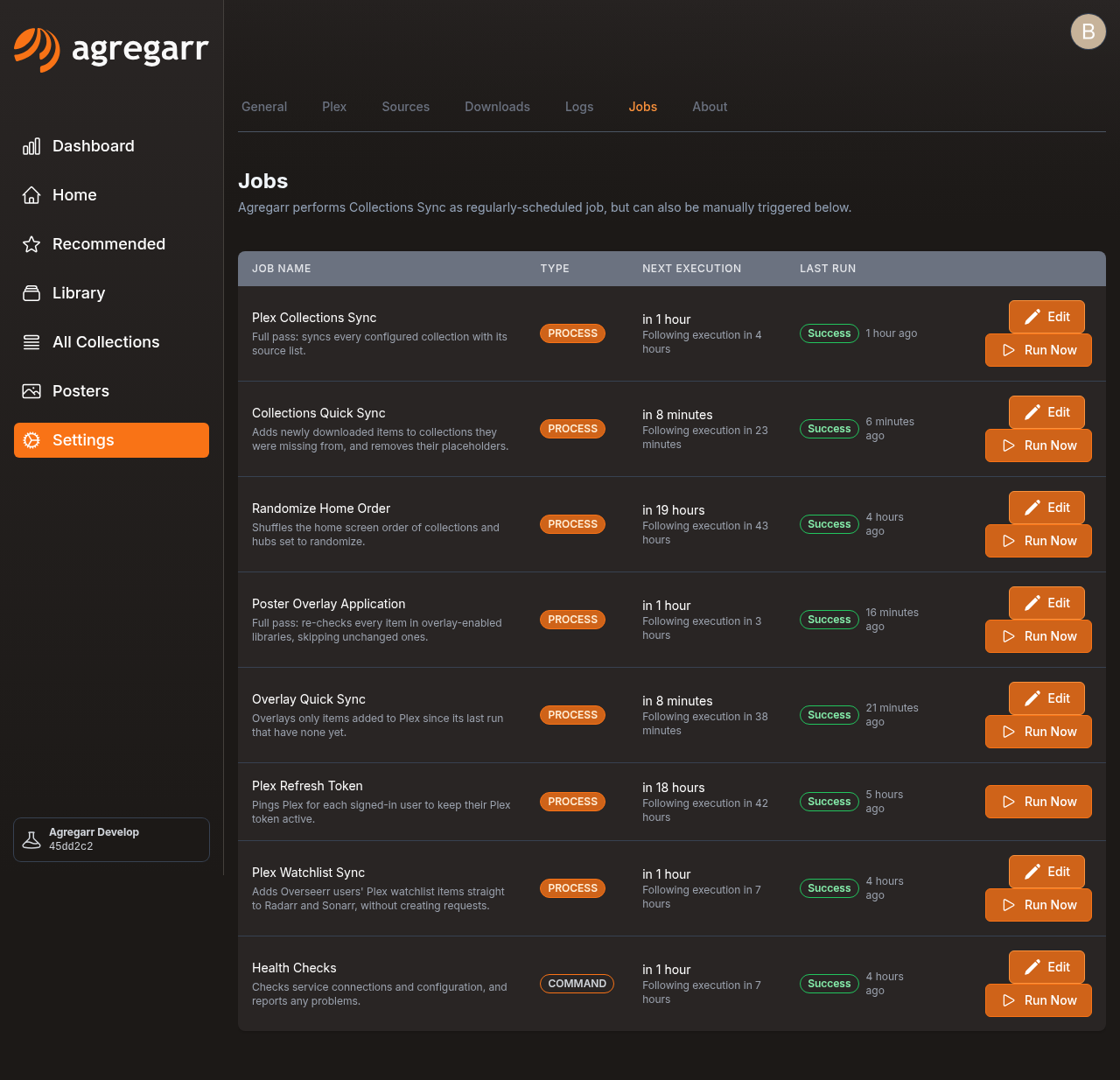
Settings > Jobs lists the scheduled jobs. Each row shows a one-line description under the name, a Last Run badge, an Edit button for changing the frequency, and Run Now. These are the defaults:
| Job | Default | What it does |
|---|---|---|
| Plex Refresh Token | Daily at 05:00 | Pings Plex for each signed-in user to keep their Plex token active. |
| Plex Collections Sync | Every 12 hours | Full pass: syncs every configured collection with its source list. |
| Collections Quick Sync | Every 30 minutes | Adds newly downloaded items to collections they were missing from, and removes their placeholders. |
| Randomize Home Order | Daily at 06:00 | Shuffles the home screen order of collections and hubs set to randomize. |
| Poster Overlay Application | Daily at 03:00 | Full pass: re-checks every item in overlay-enabled libraries, skipping unchanged ones. |
| Overlay Quick Sync | Every 30 minutes | Overlays only items added to Plex since its last run that have none yet. |
| Plex Watchlist Sync | Every 6 hours | Adds Overseerr users' Plex watchlist items straight to Radarr and Sonarr, without creating requests. |
| Health Checks | Every 6 hours | Checks service connections and configuration, and reports any problems. |
The Last Run badge and run history are covered in Health Checks.